How To
Making Calendars in iPhoto ’06
One of my favorite new features in the upgraded iLife ’06 is the iPhoto Calendar option. You can now make an elegant calendar based on not just your iPhoto Library, but also your iCal and Address Book. Calendars are one of those ultimate craft items; they’re near universal office tchotchkes, as well as excellent family gifts at birthdays or holidays.


iPhoto guides you through the process of creating the calendar, much the same way it guides you through creating a book. When you select a group of photos to make a calendar, it will ask you when you want the calendar to begin, how many months you wish to have in it, and whether or not you wish to add a list of holidays from a default group. You can also include your iCal calendars. So if you have one set up for family birthdays or memorable dates, or even your school schedule for the next semester, it can be integrated into the process.

Photo selection is a hard process. I would recommend picking out 50 possible photos for use in your calendar, as it’s easier to have more options than too few. Each calendar’s top page has space for many as seven photos, or as few as a single large image. Depending on the theme you choose, the configuration of the photos will be different. Adding a photo to the page is as simple as dragging it from your sidebar into the hot zone on the top. And changing the number of photos on the page is as simple as changing a pop-up menu.

What’s really great is that iPhoto allows you to add your own text to any given day. Click on a day to add or alter the text that is already present. A window will appear, allowing you to enter text for that day. If you’re not happy with the fonts for the calendar, you can edit them, too. Most of the calendars use Helvetica Neue, but if you’re a fan of other fonts, go for it; iPhoto handles the switch with aplomb. If you’re not textually inclined, feel free to drag any photo onto a day, and it will resize the photo to fit the day’s box on the calendar.
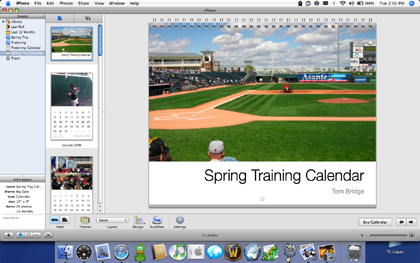
If you’re not that picky, you can have iPhoto run the Autoflow feature, which will propagate photos into all the hot zones for you automatically. If you haven’t selected enough photos, though, it will leave several of the photo hot zones blank, so you’ll want to check your pages before firing them off to Apple. You don’t want to be surprised when you receive your calendar.

At $20 for a twelve-month calendar, Apple has made an attractive price point for something you can customize to your own specifications. Give it a try; it’s worth the experience.
 Copyright © 2006 Tom Bridge, tbridge@atpm.com.
Also in This Series
- Give Alert Sounds a Little Personality · March 2012
- Create Your Own iPhone Ringtones · February 2012
- Create Your Own Homemade Audio Book · December 2011
- Upgrade to Lion Painlessly · August 2011
- Make the Most of TextEdit · July 2011
- Using the Free Disk Utility on Your Mac · May 2011
- Making Use of QuickTime X · March 2011
- Making the Most of What’s Already on Your Mac · February 2011
- Making the Most of What’s Already on Your Mac · January 2011
- Complete Archive
Reader Comments (16)
The only thing missing will be the spiral...
When I save my calendar as a PDF, the dates on the calendar do not print. Can someone help me?
is it possible to save the calendar as .ps file?
Thanks,
Ashish
Add A Comment